
In this post I cover some unpleasant side-effects of using heaps in SQL Server for anything else than staging tables.
In the past couple of months I’ve been running into performance issues caused by the strange decision to have very active tables as heaps.
And, at this point, I’m on a personal vendetta against heaps in SQL Server.
As a result, I’m writing this blog post so that I can refer people to it the next time I’ll have to explain why heaps don’t match their use cases.
Note: This post has a lot of T-SQL in it, so I’ve added all of it to my blog’s GitHub repo.
Table of contents
- What’s a heap?
- Setting the stage
- Forwarding pointers make the database engine jump through IO hoops aka forwarded fetches
- Updates and single-row inserts take a hit
- Your queries might be wasting IO by having to read empty pages
- Page-compressed heaps are lying to you
- Heaps are way more prone to deadlocks
- How to fix these issues
- When are heaps recommended in SQL Server?
- Conclusion
What’s a heap?
SQL Server has two forms of organizing traditional row-store tables:
- Heap – where rows aren’t ordered in any way.
- Clustered index – where rows are ordered based on the clustering key.
You can think of a heap table as a pile of pages dumped randomly on your desk.
If you want to add a new row, you’ll first have to look for some empty space on one of these existing pages, and, only if there isn’t any, you can decide to add a new page to the pile.
Meanwhile, a clustered index is similar to a book, where rows are nicely ordered across pages and are easy to navigate.
If you want to add something new you’ll need to do it at the end of the book, by using existing empty space on the last page or by adding fresh new pages.
Setting the stage
Without actual data to back this up, I’d be just another rando with opinions.
Throughout this post I’ll be looking at how a heap behaves compared to a clustered index.
So, we’ll need a test database and two tables.
| 1 2 3 4 5 6 7 8 9 10 11 12 13 14 15 16 17 18 19 20 21 22 23 24 25 26 27 28 29 30 31 32 33 34 35 36 37 38 39 40 | USE [master] GO IF EXISTS (SELECT 1 FROM sys.[databases] WHERE name = N'oh_my_heap') DROP DATABASE [oh_my_heap]; GO CREATE DATABASE [oh_my_heap]; GO ALTER DATABASE [oh_my_heap] SET RECOVERY SIMPLE; GO /*pre-grow the data and t-log files to avoid wasting time with this further down the line*/ ALTER DATABASE [oh_my_heap] MODIFY FILE ( NAME = N'oh_my_heap', SIZE = 5242880KB ); GO ALTER DATABASE [oh_my_heap] MODIFY FILE ( NAME = N'oh_my_heap_log', SIZE = 2097152KB ); GO USE [oh_my_heap]; GO CREATE TABLE [active_cluster] ( [id] INT NOT NULL IDENTITY(1, 1), [short_nvarchar] NVARCHAR(50), [medium_nvarchar] NVARCHAR(240), [long_nvarchar] NVARCHAR(400), [time_stamp] DATETIME DEFAULT GETDATE(), [is_full] BIT NOT NULL DEFAULT 0 ); GO CREATE TABLE [active_heap] ( [id] INT NOT NULL IDENTITY(1, 1), [short_nvarchar] NVARCHAR(50), [medium_nvarchar] NVARCHAR(240), [long_nvarchar] NVARCHAR(400), [time_stamp] DATETIME DEFAULT GETDATE(), [is_full] BIT NOT NULL DEFAULT 0 ); GO |
Then I populate the two tables with 1 million records each.
| 1 2 3 4 5 6 7 8 9 10 11 12 13 14 | INSERT INTO [active_heap] WITH(TABLOCK) ([short_nvarchar]) SELECT TOP(1000000) NULL FROM sys.all_columns c CROSS APPLY sys.all_columns c1 CROSS APPLY sys.all_columns c2 OPTION (MAXDOP 0); GO INSERT INTO [active_cluster] WITH(TABLOCK) ([short_nvarchar]) SELECT TOP(1000000) NULL FROM sys.all_columns c CROSS APPLY sys.all_columns c1 CROSS APPLY sys.all_columns c2 OPTION (MAXDOP 0); GO |
I create a clustered index on the active_cluster table.
| 1 2 3 4 | CREATE UNIQUE CLUSTERED INDEX [cix_active_cluster] ON [active_cluster]([id]) WITH (ONLINE=OFF, MAXDOP=0); GO |
And I also create a nonclustered index for the id column of the active_heap table to help with the next part of the demo.
| 1 2 3 4 | CREATE INDEX [ix_active_heap] ON [active_heap]([id]) WITH (ONLINE=OFF, MAXDOP=0); GO |
Forwarding pointers make the database engine jump through IO hoops aka forwarded fetches
What are forwarding pointers?
When updating a variable length column from either NULL to non-NULL or a narrow value to a wider one, if there isn’t any free space left on the row’s current 8KB page (the smallest unit of storage in SQL Server), the database engine will move that row to another page (either existing or new) with sufficient space to accommodate the updated row.
When this move is done, SQL Server leaves a forwarding pointer in the original place of the row that points to where the row now resides.
Think of the forwarding pointer as a post-it note on a neighbor’s door informing people they’ve moved to a new place.
What are forwarded fetches?
A forwarded fetch occurs whenever a query requests on of those records that has been moved as a result of an update.
Every time the database engine has to read one of those forwarding pointers, and go to the new location to get a row, you get a forwarded fetch.
The more rows “relocated”, the more forwarding pointers SQL Server has to go through, the more forwarded fetches it does.
Causing them
To simulate the DML patterns that cause forwarding pointers, I’ll use the following two scripts.
For the heap table:
| 1 2 3 4 5 6 7 8 9 10 11 12 13 14 15 16 17 18 19 20 21 22 23 24 25 26 27 28 29 30 31 32 33 34 35 36 37 38 39 40 41 42 43 44 | SET NOCOUNT ON; GO DECLARE @i INT = 0, @rows INT = 1010100, @i2 INT, @string1 NVARCHAR(50) = REPLICATE(N'a', 50), @string2 NVARCHAR(120) = REPLICATE(N'b', 120), @string3 NVARCHAR(200) = REPLICATE(N'c', 200), @start DATETIME = GETDATE(), @end DATETIME; WHILE @i < @rows+200 BEGIN SET @i +=1; UPDATE [active_heap] SET [short_nvarchar] = @string1 WHERE id = @i; IF (@i % 100 = 0) BEGIN INSERT INTO [active_heap]([short_nvarchar]) VALUES (@string1); END; IF (@i > 100) BEGIN SET @i2 = @i - 100; UPDATE [active_heap] SET [medium_nvarchar] = @string2, [long_nvarchar] = @string3 WHERE id = @i2; END; IF (@i > 200) BEGIN SET @i2 = @i - 200; UPDATE [active_heap] SET [medium_nvarchar] = [medium_nvarchar] + @string2, [long_nvarchar] = [long_nvarchar] + @string3 WHERE id = @i2; END; IF (@i % 20000 = 0 OR @i = @rows) BEGIN RAISERROR ('Processed %d rows',10,1,@i) WITH NOWAIT; END; END; SELECT @end = GETDATE(); SELECT 'active_heap' AS target_table, CAST(DATEDIFF(MILLISECOND,@start,@end)/1000. AS DECIMAL(23,2)) AS total_duration_sec; |
For the clustered index:
| 1 2 3 4 5 6 7 8 9 10 11 12 13 14 15 16 17 18 19 20 21 22 23 24 25 26 27 28 29 30 31 32 33 34 35 36 37 38 39 40 41 42 43 44 | SET NOCOUNT ON; GO DECLARE @i INT = 0, @rows INT = 1010100, @i2 INT, @string1 NVARCHAR(50) = REPLICATE(N'a', 50), @string2 NVARCHAR(120) = REPLICATE(N'b', 120), @string3 NVARCHAR(200) = REPLICATE(N'c', 200), @start DATETIME = GETDATE(), @end DATETIME; WHILE @i < @rows+200 BEGIN SET @i +=1; UPDATE [active_cluster] SET [short_nvarchar] = @string1 WHERE id = @i; IF (@i % 100 = 0) BEGIN INSERT INTO [active_cluster]([short_nvarchar]) VALUES (@string1); END; IF (@i > 100) BEGIN SET @i2 = @i - 100; UPDATE [active_cluster] SET [medium_nvarchar] = @string2, [long_nvarchar] = @string3 WHERE id = @i2; END; IF (@i > 200) BEGIN SET @i2 = @i - 200; UPDATE [active_cluster] SET [medium_nvarchar] = [medium_nvarchar] + @string2, [long_nvarchar] = [long_nvarchar] + @string3 WHERE id = @i2; END; IF (@i % 20000 = 0 OR @i = @rows) BEGIN RAISERROR ('Processed %d rows',10,1,@i) WITH NOWAIT; END; END; SELECT @end = GETDATE(); SELECT 'active_cluster' AS target_table, CAST(DATEDIFF(MILLISECOND,@start,@end)/1000. AS DECIMAL(23,2)) AS total_duration_sec; |
The only difference between the two T-SQL scripts is the table each of them targets.
In terms of what they do:
- Iterate through each id and update the short_nvarchar column from NULL to a value equal with the max width of the column
- Once the current id is > 100, it goes back to current id minus 100 and updates medium_nvarchar and long_nvarchar to strings that are half the max width of the respective columns.
- Once the current id is > 200, it goes back to current id minus 200 and updates medium_nvarchar and long_nvarchar to strings that are the full max width of the respective columns.
- A new row is inserted with the short_nvarchar column fully populated once every 100 rows.
I run these two in different query editor tabs, one after the other.
When the scripts finish executing, both tables have 1,010,103 records.
The following screenshot is the result of a slightly modified version of my script to return table sizes.

Identifying forwarded fetches
Since the above T-SQL looks for rows that have been previously updated, it also causes lots of forwarded fetches during its execution.
And, since Brent Ozar’s sp_BlitzIndex and, by extension, PSBlitz will warn you about heaps with forwarded fetches, all I have to do is run it with a basic execution:
| 1 | EXEC sp_BlitzIndex @DatabaseName = N'oh_my_heap'; |

For reference, this is how the result looks in PSBlitz’s “Index Diagnosis” page:

In this case there have already been 4.35 million forwarded fetches against the active_heap table.
You can also use the following query to identify heaps with forwarded records.
| 1 2 3 4 5 6 7 8 9 10 | SELECT OBJECT_NAME([i].[object_id]) AS [table_name], [ips].[index_type_desc], [ips].[alloc_unit_type_desc], [ips].[record_count], [ips].[forwarded_record_count], [ips].[avg_fragmentation_in_percent] FROM sys.[indexes] AS [i] CROSS APPLY sys.dm_db_index_physical_stats (DB_ID(), [i].[object_id], NULL, NULL, 'DETAILED') AS [ips] WHERE [i].[index_id] = 0 AND [ips].[forwarded_record_count] > 0; |

Two things to note here:
- Based on the forwarded_record_count value of 1,006,072, almost all of the records in active_heap table have been “relocated”.
- The value of the record_count column (2,016,175) is the sum of the actual row count (1,010,103) and the forwarded rows count (1,006,072).
Deep dive into the data pages
I use the following query to get the first 10 data pages from active_heap and the first 10 data pages from active_cluster.
| 1 2 3 4 5 6 7 8 9 10 11 12 13 14 15 16 17 18 | SELECT TOP(10) DB_NAME([p_info].[database_id]) AS [database_name], OBJECT_NAME([p_info].[object_id]) AS [table_name], [p_info].[page_id], [p_info].[page_type_desc], [p_info].[free_bytes] FROM sys.dm_db_database_page_allocations(db_id(), object_id('active_heap'), NULL, NULL, 'DETAILED') [p_alloc] CROSS APPLY sys.dm_db_page_info([p_alloc].[database_id], [p_alloc].[allocated_page_file_id], [p_alloc].[allocated_page_page_id], 'DETAILED') AS [p_info] WHERE [p_alloc].[page_type_desc] = N'DATA_PAGE' UNION SELECT TOP(10) DB_NAME([p_info].[database_id]) AS [database_name], OBJECT_NAME([p_info].[object_id]) AS [table_name], [p_info].[page_id], [p_info].[page_type_desc], [p_info].[free_bytes] FROM sys.dm_db_database_page_allocations(db_id(), object_id('active_cluster'), NULL, NULL, 'DETAILED') [p_alloc] CROSS APPLY sys.dm_db_page_info([p_alloc].[database_id], [p_alloc].[allocated_page_file_id], [p_alloc].[allocated_page_page_id], 'DETAILED') AS [p_info] WHERE [p_alloc].[page_type_desc] = N'DATA_PAGE' ORDER BY [table_name] DESC, [page_id] ASC; |

From that result set I pick data page id 392 from the active_heap table, and use it in the following DBCC command to view the contents of that page.
| 1 2 3 | DBCC PAGE ('oh_my_heap'/*db name*/,1 /*db file id*/, 392 /*page id*/, 3 /*info level*/) WITH TABLERESULTS; |
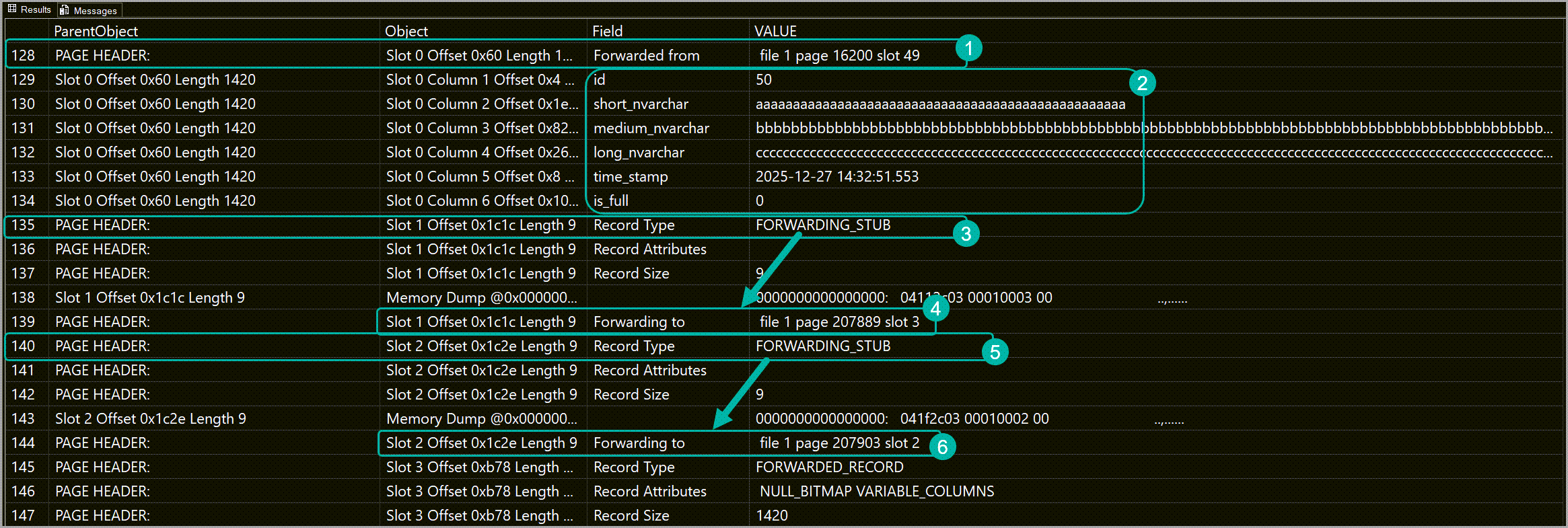
In the above screenshot you can see that on slot 0 (on data pages each row is assigned to a slot) we have a row that was relocated here from page 16200 slot 49. This is marked in the header (1) as “Forwarded from”.
This means that before the updates, this row originally resided on a different page, but was moved here because during the update this page had sufficient free space to accommodate the updated record.
If I run the same DBCC command, but for page id 16200, and scroll down to slot 49 we’ll see a forwarding stub stating that the record has been forwarded to slot 0 of page 392.

Going back to our initial screenshot: in the section marked with 2 you can see the column names and values for this record.
Then, in slot number 1’s header (marked with 3 in the screenshot) we have a forwarding stub that tells us that the record, which originally resided here, has been moved to slot 3 of page 207889 (4).
Since this record has been moved, there is no information here for its values.
Slot number 2 tells a similar story, with the record that originally resided here being relocated to slot 2 of page 207903 during the update.
Side note: If you find SQL Server’s data storage internals interesting, I cannot recommend enough Randolph West‘s presentation – How does SQL Server store that data type.
What about the clustered index?
Unlike heaps, clustered indexes do not rely on the same row identifier (comprised of file id, page id and slot number) mechanism to keep track of where each record is.
Instead, the clustering key is used to identify where records are.
This means that, during an update that increases the size of a row in a clustered index, rows can just be moved to a new page without leaving forwarding pointers their place since the clustering key value (in this case the rows’ id values) moves together with the rows on the new page.
As a result, we don’t get any forwarding pointers, but we do get more internal fragmentation than we get in the case of heaps.
| 1 2 3 4 5 6 7 8 9 | SELECT OBJECT_NAME([i].[object_id]) AS [table_name], [ips].[index_type_desc], [ips].[alloc_unit_type_desc], [ips].[record_count], [ips].[forwarded_record_count], [ips].[avg_fragmentation_in_percent] FROM sys.[indexes] AS [i] CROSS APPLY sys.dm_db_index_physical_stats (DB_ID(), [i].[object_id], NULL, NULL, 'DETAILED') AS [ips] WHERE [ips].[index_id] IN (1) AND [ips].[index_level] = 0; |

We can confirm the lack of forwarding pointers by checking the contents of a data page belonging to the active_cluster table.
In this case, I’m dumping the output of DBCC PAGE to a temp table so that I can easier display multiple data pages.
| 1 2 3 4 5 6 7 8 9 10 11 12 13 14 15 16 17 18 19 20 21 22 | CREATE TABLE #dbcc_results ( [id] INT NOT NULL IDENTITY(1, 1), [page_id] INT, [parent_object] NVARCHAR(MAX), [object] NVARCHAR(MAX), [field] NVARCHAR(MAX), [value] NVARCHAR(MAX) ); GO INSERT INTO #dbcc_results([parent_object],[object],[field],[value]) EXEC('DBCC PAGE (''oh_my_heap'',1 ,111400, 3) WITH TABLERESULTS'); UPDATE #dbcc_results SET [page_id] = 111400 WHERE [page_id] IS NULL; GO INSERT INTO #dbcc_results([parent_object],[object],[field],[value]) EXEC('DBCC PAGE (''oh_my_heap'',1 ,111401, 3) WITH TABLERESULTS'); UPDATE #dbcc_results SET [page_id] = 111401 WHERE [page_id] IS NULL; GO INSERT INTO #dbcc_results([parent_object],[object],[field],[value]) EXEC('DBCC PAGE (''oh_my_heap'',1 ,111402, 3) WITH TABLERESULTS'); UPDATE #dbcc_results SET [page_id] = 111402 WHERE [page_id] IS NULL; GO |
And then I can query the results for the information that I’m actually interested in.
| 1 2 3 4 | SELECT * FROM #dbcc_results WHERE [object] LIKE N'Slot % Column % Offset %' OR [value] LIKE N'FORWARD%' ORDER BY [id]; |

There are two things to note here:
- The lack of forwarded records and forwarding stubs.
- The fact that the first page contains the first 5 rows (note the value of the id column) and the second page contains rows with id 369, 370 through 373 (not captured in the screenshot).
This is due to how SQL Server manages data in pages belonging to clustered indexes, leading to not requiring forwarding pointers but also causing the high internal fragmentation seen in this case.
Why are forwarded fetches bad for performance?
As mentioned previously, every time SQL Server needs to get to rows that have been moved inside a heap, it needs to first read the forwarding pointer to get the new location of the record and then retrieve the data for that record from its new location.
Due to how forwarded records can be scattered back and forth among data pages (remember the screenshot with the data page contents from the active_heap table), SQL Server may end up wasting a lot of IO and CPU to get all the forwarded records required by a query.
The amount of damage forwarded fetches do to performance gets compounded by the following factors:
- Slow storage (looking at you, Azure SQL DB).
- Instance workload.
- Table size (number of pages that make up the table).
- The amount of rows returned by the query.
But again, this would just be meaningless word vomit without actual numbers to back it up.
So, I set STATISTICS IO on and get the same 500 rows from each table.
| 1 2 3 4 5 6 | SET STATISTICS IO ON; GO SELECT * FROM [active_heap] WHERE [id] BETWEEN 501 AND 1000; GO SELECT * FROM [active_cluster] WHERE [id] BETWEEN 501 AND 1000; GO |
I’m not posting the result set since you can pretty much figure out how it, looks.
The relevant part here is the IO statistics output.
(500 rows affected)
Table ‘active_heap‘. Scan count 1, logical reads 1003, physical reads 0, page server reads 0,
read-ahead reads 0, page server read-ahead reads 0, lob logical reads 0, lob physical reads 0,
lob page server reads 0, lob read-ahead reads 0, lob page server read-ahead reads 0.(500 rows affected)
Table ‘active_cluster‘. Scan count 1, logical reads 116, physical reads 0, page server reads 0,
read-ahead reads 0, page server read-ahead reads 0, lob logical reads 0, lob physical reads 0,
lob page server reads 0, lob read-ahead reads 0, lob page server read-ahead reads 0.
Notice how, for the heap table, SQL Server had to read 1003 8KB pages (7.83MB) as opposed to the 116 8KB pages (0.90MB) it did for the clustered index?
Even with the 68% fragmentation* in the clustered index, reading data from it is still more efficient than from the heap.
*Index fragmentation isn’t the boogeyman it used to be back in spinning rusty disk days.
From my experience, as long as you’re under 90-95% fragmentation the impact isn’t even noticeable on decent storage.
At this point you might say that the heap has all those extra page reads because the WHERE clause requires a seek in the nonclustered index, and the SELECT * will cause a RID Lookup to get the rest of the data from the heap. And you are correct, but RID lookups are also impacted by forwarding pointers.
But, just to exclude those RID lookups, I’m doing the simplest query possible, just getting 500 rows from each table.
| 1 2 3 4 5 6 7 | DBCC FREEPROCCACHE; DBCC DROPCLEANBUFFERS; GO SELECT TOP(500) * FROM [active_heap]; GO SELECT TOP(500) * FROM [active_cluster]; GO |
(500 rows affected)
Table ‘active_heap‘. Scan count 1, logical reads 502, physical reads 25, page server reads 0,
read-ahead reads 0, page server read-ahead reads 0, lob logical reads 0, lob physical reads 0,
lob page server reads 0, lob read-ahead reads 0, lob page server read-ahead reads 0.(500 rows affected)
Table ‘active_cluster‘. Scan count 1, logical reads 133, physical reads 3, page server reads 0,
read-ahead reads 0, page server read-ahead reads 0, lob logical reads 0, lob physical reads 0,
lob page server reads 0, lob read-ahead reads 0, lob page server read-ahead reads 0.
And we still get a bunch of extra 8KB page reads for the query against the active_heap table.
Updates and single-row inserts take a hit
When inserting a row in a heap, the database engine first checks already allocated pages to see if there’s one with enough space to accommodate the new row. If there is one, then SQL Server dumps the row there, if there isn’t, SQL Server will need to allocate new pages to the table so that it has where to write the new record.
The messier the heap (many forwarding pointers, many allocated empty pages, pages with random amounts of free space) the worst your single-row insert performance is going to be.
The same applies for updates that change the size of an existing record (i.e.: updates that cause forwarding pointers).
The timing for T-SQL scripts used to cause the forwarding pointers are as follows:

820.38 seconds against the heap vs 286.51 seconds against the clustered index is a very big difference.
The per statement stats can be seen using Brent Ozar’s sp_BlitzCache, which I’ve executed right after the scripts finished.
| 1 | EXEC sp_BlitzCache @SortOrder = N'duration', @DatabaseName = N'oh_my_heap'; |

First thing to note is that the average duration of each UPDATE and INSERT is sub-millisecond, but the total duration varies greatly between the UPDATEs and INSERTs hitting the heap and the ones hitting the clustered index.
I’m going to use the result grid row numbers to navigate this set, and the operations are ordered by total duration, not the order they’re done in the script.
| Operation | Executions | active_heap total duration (seconds) | active_cluster total duration (seconds) | rows in result set grid |
| initial UPDATE on medium_nvarchar, long_nvarchar | 1,010,200 | 427.03 | 19.56 | 1 and 4 |
| UPDATE on short_nvarchar | 1,010,300 | 83.31 | 14.31 | 2 and 6 |
| second UPDATE on medium_nvarchar, long_nvarchar | 1,010,100 | 47.56 | 16.78 | 3 and 5 |
| INSERT | 10,103 | 4.37 | 0.25 | 7 and 8 |
Yes, I overshot the number of executions for two updates, but that has no bearing on the timing differences between the two tables.
The results speak for themselves, both updates and inserts take noticeably longer on the heap as opposed to the clustered index.
And this only gets worse the larger the heap is, and even more so on slower storage.
Your queries might be wasting IO by having to read empty pages
Heaps in SQL Server do not de-allocate all empty pages resulting after a delete, unless the delete takes an exclusive lock on the table.
Allocated empty pages get reused by new data when it’s inserted.
But if you’ve ended up with a very large table by accident and decided that you only need a small number of rows in it, those empty but still allocated pages will come back to haunt you.
I’m deleting all but one row in both tables.
| 1 2 3 4 5 6 7 8 9 10 11 12 13 14 | SET NOCOUNT ON; GO DECLARE @batch_size INT = 1000, @deleted INT; WHILE 1=1 BEGIN DELETE TOP (@batch_size) FROM [active_cluster] WHERE [id] <> 1; DELETE TOP (@batch_size) FROM [active_heap] WHERE [id] <> 1; SET @deleted = @@ROWCOUNT; IF @deleted < @batch_size BEGIN BREAK; END; END; |
Re-checking the table sizes shows that the active_heap table still has all 203689 pages still allocated to it even if it only has a single row.

Retrieving all the data (that one single row) from each table with STATISTICS IO set to on, shows what’s happening.
| 1 2 3 4 5 6 | SET STATISTICS IO ON; GO SELECT * FROM [active_heap]; GO SELECT * FROM [active_cluster]; GO |
(1 row affected)
Table ‘active_heap‘. Scan count 1, logical reads 203658, physical reads 0, page server reads 0,
read-ahead reads 0, page server read-ahead reads 0, lob logical reads 0, lob physical reads 0,
lob page server reads 0, lob read-ahead reads 0, lob page server read-ahead reads 0.(1 row affected)
Table ‘active_cluster‘. Scan count 1, logical reads 4, physical reads 0, page server reads 0,
read-ahead reads 0, page server read-ahead reads 0, lob logical reads 0, lob physical reads 0,
lob page server reads 0, lob read-ahead reads 0, lob page server read-ahead reads 0.
So, SQL Server ends up reading 203658 8KB pages from disk just to return a single row from the heap table.
And even if your DELETE gets an exclusive lock on the table
Empty pages will not be released if any of these conditions apply:
- The database uses a versioning isolation level (SI, RCSI).
And using a different isolation level at the session level won’t help. - The heap has a LOB column ( (N)VARCHAR(MAX), XML, VARBINARY, VECTOR).
The column doesn’t need to be populated, it just needs to exist for it to mess with empty page de-allocation.
Those empty pages get reused, but at what cost?
Earlier I’ve mentioned that the messier the heap, the higher the impact on single-row inserts.
To test this after the delete that I’ve just ran, I drop the nonclustered index on the active_heap table (to avoid the “that nonclustered index slowed down your inserts” allegations), I free the plan and buffer cache and insert a million rows into both the heap and the clustered index.
| 1 2 3 4 5 6 7 8 9 10 11 12 13 14 15 16 17 18 19 20 21 22 23 24 25 26 27 28 29 30 31 32 33 34 35 36 37 38 39 40 41 42 43 44 45 46 47 48 49 50 51 52 53 54 55 | /*drop the nonclustered index*/ DROP INDEX [ix_active_heap] ON [active_heap]; GO CHECKPOINT; GO DBCC DROPCLEANBUFFERS; DBCC FREEPROCCACHE; GO SET NOCOUNT ON; GO /*insert 1mill records in the heap table*/ DECLARE @i INT = 0, @rows INT = 1000000, @string1 NVARCHAR(50) = REPLICATE(N'a', 50), @string2 NVARCHAR(120) = REPLICATE(N'b', 120), @string3 NVARCHAR(200) = REPLICATE(N'c', 200), @start DATETIME = GETDATE(), @end DATETIME; WHILE @i < @rows BEGIN SET @i +=1; INSERT INTO [active_heap] ([short_nvarchar],[medium_nvarchar],[long_nvarchar]) VALUES (@string1,@string2,@string3); IF (@i % 20000 = 0 OR @i = @rows) BEGIN RAISERROR ('Processed %d rows',10,1,@i) WITH NOWAIT; END; END; SELECT @end = GETDATE(); SELECT 'active_heap' AS target_table, CAST(DATEDIFF(MILLISECOND,@start,@end)/1000. AS DECIMAL(23,2)) AS total_duration_sec; GO CHECKPOINT; GO /*insert 1mill records in the clustered index*/ DECLARE @i INT = 0, @rows INT = 1000000, @string1 NVARCHAR(50) = REPLICATE(N'a', 50), @string2 NVARCHAR(120) = REPLICATE(N'b', 120), @string3 NVARCHAR(200) = REPLICATE(N'c', 200), @start DATETIME = GETDATE(), @end DATETIME; WHILE @i < @rows BEGIN SET @i +=1; INSERT INTO [active_cluster] ([short_nvarchar],[medium_nvarchar],[long_nvarchar]) VALUES (@string1,@string2,@string3); IF (@i % 20000 = 0 OR @i = @rows) BEGIN RAISERROR ('Processed %d rows',10,1,@i) WITH NOWAIT; END; END; SELECT @end = GETDATE(); SELECT 'active_cluster' AS target_table, CAST(DATEDIFF(MILLISECOND,@start,@end)/1000. AS DECIMAL(23,2)) AS total_duration_sec; |
The output from the two rounds of inserts shows a pretty hefty difference between the heap table and the clustered index.

Looking at the sp_BlitzCache results to see the actual duration of the inserts reveals that the total duration of the 1 million inserts against the active_heap table took 136.53 seconds.
The same amount of inserts against the active_cluster table only took 16.93 seconds.

I delete again all but one record from both tables, but this time I rebuild the heap before redoing the above inserts.
| 1 2 | ALTER TABLE [active_heap] REBUILD WITH (MAXDOP=0, ONLINE=OFF); GO |
This time the timings are much closer between the two tables.

sp_BlitzCache confirms that, while still higher than the clustered index, the total duration of the inserts against the heap is drastically reduced.
With 20.26 seconds for the heap table and 17.29 seconds for the clustered index.

Page-compressed heaps are lying to you
I’ve covered this in detail in a previous post.
The short version:
New rows added to a page-compressed heap will get page compression only under very specific circumstances.
Otherwise they’ll be stuck with row compression until the table is rebuilt.
Heaps are way more prone to deadlocks
Due to a combination of their drawbacks (forwarded records and empty pages increasing the IO overhead, the access method being a full table scan if you don’t have a covering index or the engine decides that a scan is less expensive than seek + RID lookup), heaps become way more prone to deadlocks when concurrency is thrown in the mix.
How to fix these issues
Short term fixes – not recommended due to extra hassle
Forwarded fetches
Rebuild the heap periodically.
Rows compressed with row compression on page compressed heaps
Rebuild the heap periodically.
Insert and update performance
The fewer pages SQL Server has to check for free space, the quicker the INSERT/UPDATE.
So, keep those heaps small.
And, if you’re doing that using DELETE, you’ll also need to…

Note for fans of Ola Hallengren’s awesome maintenance solution
Ola Hallengren’s IndexOptimize stored procedure does not target heaps for rebuilds, so you’ll either have to modify the stored procedure to also target heaps, or put together a dedicated heap rebuild procedure.
The permanent fix – recommended
If that table is used in regular SELECT, single-row INSERT, UPDATE, and DELETE operations, then it should always be a clustered index.
When are heaps recommended in SQL Server?
In short: staging tables
Tables where the usage pattern is generally something like this:
- Load data into a heap using bulk insert. Because heaps are really good for that.
- Read all the data from the heap, potentially process it, and then insert it into its final destination.
- Truncate or drop the heap you just used.
Or when you’re doing an initial bulk data load, the tables can be heaps to speed up the bulk load.
But you’ll have to create clustered indexes when the bulk load is done.
Conclusion
Heap tables in SQL Server have their limited uses for which they’re really good, but, outside of those specific use cases, your tables should almost always be clustered indexes.
2 comments
I can’t believe I just watched my own presentation about data types. Thanks for the mention 😌
Thanks for taking the time to read and comment, Randolph!
Also, that’s one great presentation on data types and I recommend it to folks every chance I get 😀