
In this post I’ll cover ways of speeding up SELECT COUNT in SQL Server as well as some myths about best practices when it comes to SELECT COUNT.
SELECT COUNT use cases
SELECT COUNT is used to retrieve the number of records that match a search criteria or just the number of records in an entire table.
Reasons for retrieving the number of records varies from doing pre and post data load checks, to audit and reporting-related work.
The myth
People tend to have some very strong opinions about how to do SELECT COUNT best.
With the main narrative being that SELECT COUNT(*) performs the worst, it should be avoided at all cost, and SELECT COUNT(1) or SELECT COUNT(ID) perform the best.
But is it true?
For the demos In this post, I’ll be using the Users table (8917507 records) in the 180GB version of the StackOverflow database provided by Brent Ozar, hosted on a SQL Server 2019 Developer Edition instance with CU 21.
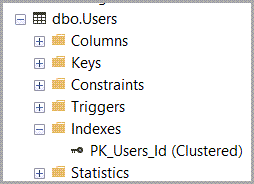
At this point, the only index I have on the Users table is the clustered index.
All the test queries will be ran with time and IO statistics enabled at the session level.
| 1 | SET STATISTICS IO, TIME ON; |
And I’ll also flush the plan and buffer cache between tests.
| 1 2 | DBCC DROPCLEANBUFFERS; DBCC FREEPROCCACHE; |
First up, the two “best” ways:
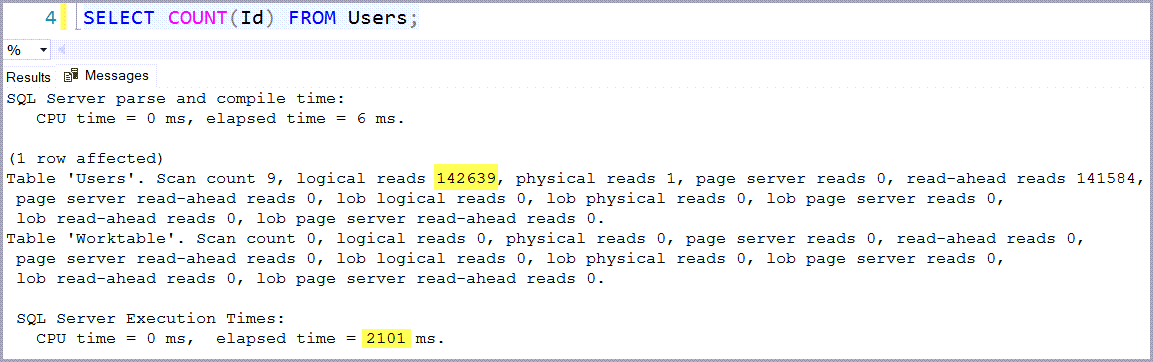
| 1 | SELECT COUNT(Id) FROM Users; |
| 1 | SELECT COUNT(1) FROM Users; |
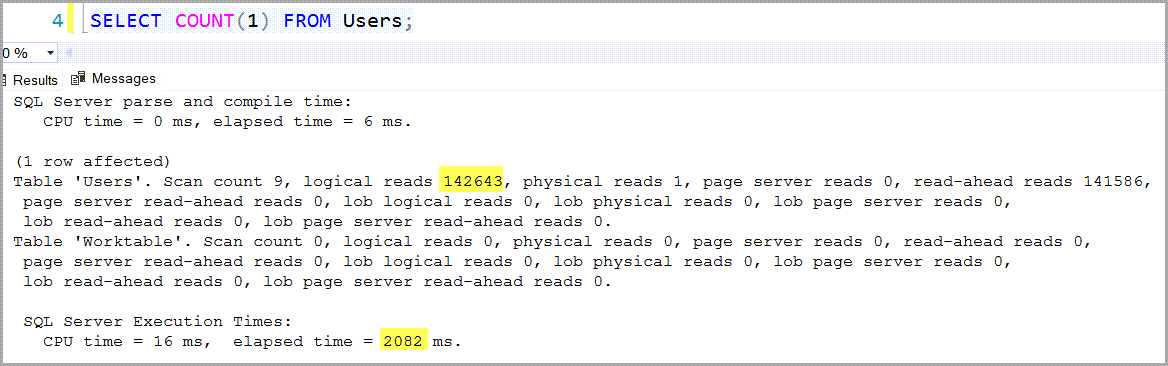
Both versions of the query took a little over 2 seconds and they both read around the same number of 8KB pages (pretty much the whole table) in order to get the count.
This means that the COUNT(*) version is really bad, right?
| 1 | SELECT COUNT(*) FROM Users; |
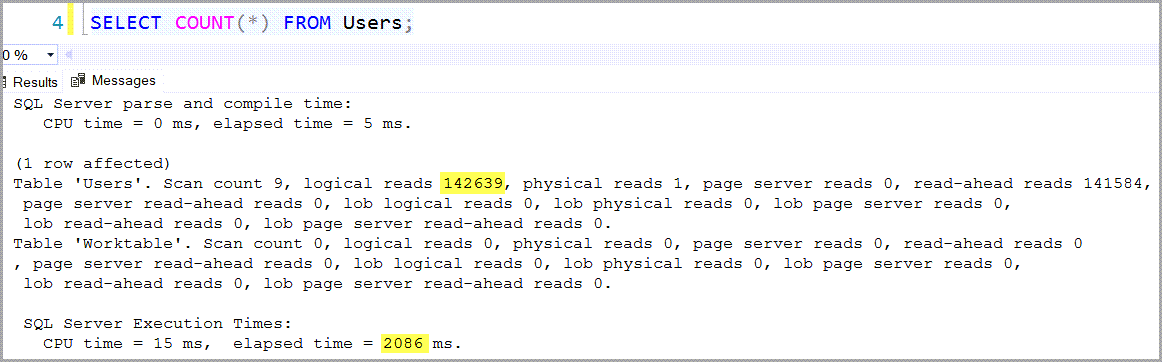
Well… no, since you can’t really do much worse than reading the whole clustered index, and, since this table only has the clustered index that’s what every version of this query will end up using.
The execution plans look identical for all three versions.

What about the speeding up SELECT COUNT part?
That’s simple, just create a nonclustered index on the table.
Since, in most cases, a nonclustered index will contain one or a small subset of the table’s columns, it will end up being made up by fewer pages than the clustered index.
And SQL Server will always opt to use the narrowest copy of the table to fulfill a query.
This isn’t such a big change anyway since, if other queries are actively using that table, you most likely need at least one nonclustered index on it anyway.
| 1 2 | CREATE INDEX Users_Location ON Users([Location]); |
Now how does the SELECT COUNT(*) version perform?

So, with the nonclustered index, SQL Server reads 7 times fewer pages and returns the result in half a second. And SQL Server didn’t have to create a worktable.
Looking at the execution plan reveals why.
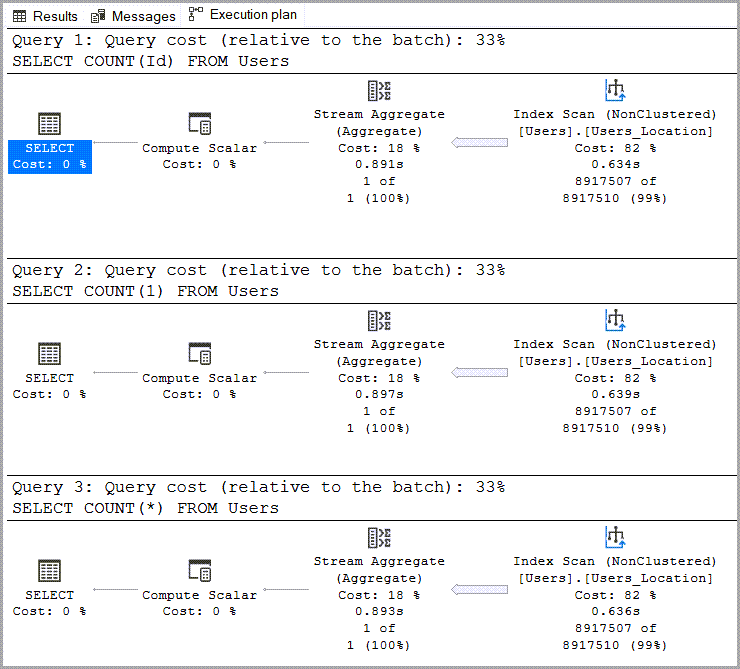
Since the index on Location contains the same number of rows that the clustered index contains, SQL Server is able to use it as a light-weight copy of the table to fulfill the query with less effort.
Speeding up SELECT COUNT even more
Is it possible to squeeze a little bit more performance improvement out of this?
Yes, with a nonclustered columnstore index.
| 1 2 | CREATE NONCLUSTERED COLUMNSTORE INDEX CS_Users_Location ON Users([Location]); |
Note, that I haven’t dropped the previously created nonclustered index.
Using the same SELECT COUNT(*) version just to drive the point home that it doesn’t really matter which version you use.

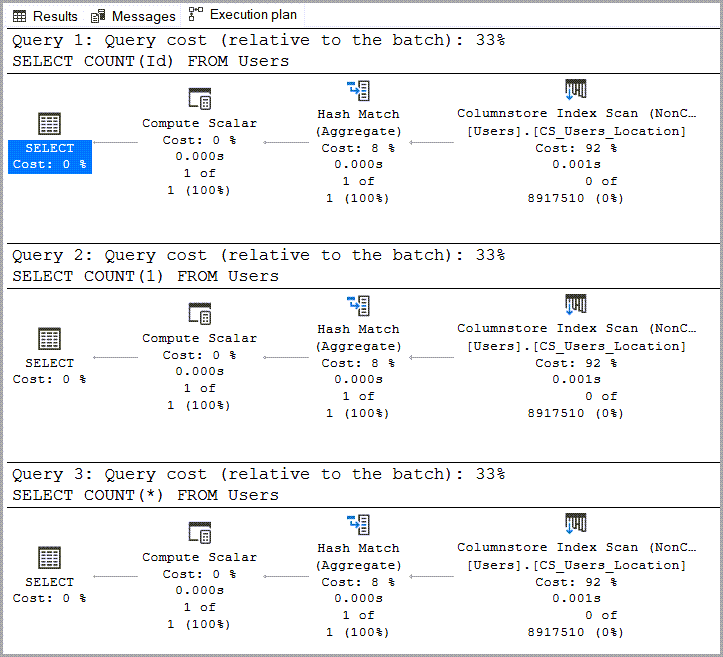
With the nonclustered columnstore index on the Location column, SQL Server was able to return the result in 67 milliseconds with 0 milliseconds of CPU time.
The execution plan reveals that, even if the previously created nonclustered index was still there, SQL Server used the nonclustered columnstore index because it was the most efficient option.
Bonus party trick
When SQL Server uses the nonclustered columnstore index or the clustered index, it will throw a divide by zero error when running SELECT COUNT(1/0).

Hinting index id 1 to make SQL Server use the clustered index this time.

Which is what people usually expect to happen, but when SQL Server uses the nonclustered rowstore index, doing SELECT COUNT(1/0) doesn’t throw a divide by zero error.
In my example I’ll hint the nonclustered index because I have not dropped the nonclustered columnstore index.
| 1 2 | SELECT COUNT(1/0) FROM Users WITH(INDEX = [Users_Location]); |

Conclusion
Performance wise, there is no difference in how SQL Server treats COUNT(*) vs COUNT(Id) vs COUNT(1).
Speeding up SELECT COUNT is as simple as adding a nonclustered index on the table.
For the best possible performance you can use nonclustered columnstore index, but only if it’s vital for your use case, otherwise I wouldn’t recommend adding it just for a count.
If you liked this post, you might also enjoy my take on Brent Ozar’s query exercise – Finding long values faster.
4 comments
Also, there are some dmvs that could help in a fast counting.
https://learn.microsoft.com/en-us/archive/blogs/martijnh/sql-serverhow-to-quickly-retrieve-accurate-row-count-for-table
Hi Sab,
The 4th example in that blog post is interesting because it states that it’s accurate, yet that statement contradicts the official documentation for sys.dm_db_partition_stats which mentions that the row_count column contains “The approximate number of rows in the partition.”
I think I’ll look into how potentially (in)accurate can sys.dm_db_partition_stats get and in what scenarios for a future blog post.
Thank you,
Vlad
On a busy system, an accurate count should add TABLOCK.(or Snapshot isolation)
And the next second after it was finish, locks are released and then insert + update are happing ,deci no more accurate 🙂
Thanks,
Sab
Fair point, although, in the default read committed isolation level you don’t need tablock to ensure you’re not doing dirty reads (counting uncommitted records in this case) also it’s a bit too much to request a whole table lock if you can satisfy the query from a nonclustered index alone.
Another thing is that you can’t really force an independent software vendor to use DMVs instead of the SELECT COUNT(1) they have sprinkled all over their code in reporting, data load and application upgrade processes.
But in most cases you can throw an index on the table, even if they insist that you can’t 🙂
DMVs are great for us DBA folks in the code and scripts over which we have full control, otherwise we need to stick to minimally “invasive” tuning when we can’t really change the code.
Thank you,
Vlad