
In this post I go over some useful information that you should be aware of when working with SQL Server’s IDENTITY columns.
I initially intended for this to be more of a primer, but then I got a bit carried away and ended up with * gestures vaguely at the entire post *.
Table of contents
SQL Server’s IDENTITY property – what is it and what it does
In SQL Server, IDENTITY is a column-level property that is used to provide an auto-incremented value for every new row inserted.
All you have to do is provide a seed value and an increment value when defining said column, and SQL Server will handle it from there.
Unlike sequences, identity columns do not require additional objects like default constraints or triggers to ensure the column is populated.
Demo table with an IDENTITY column
I’ll be using this table throughout most of the examples in this post.
| 1 2 3 | CREATE TABLE [tab1] ( [id] INT NOT NULL IDENTITY(1,1), [some_column] NVARCHAR(128)); |
The basics
The main “feature” of the identity column is that it allows you to have ensure a consistently unique and ever-increasing or decreasing value for an id/primary key column without having to fuss with sequences, default constraints or triggers.
Take this INSERT for example:
| 1 2 | INSERT INTO [tab1] ([some_column]) VALUES (N'xyz'); GO 3 |
The GO 3 part tells SQL Server to execute the batch (in this case the INSERT) 3 times.
Each of the newly inserted records will have a distinct, consecutive, id value.
| 1 | SELECT * FROM [tab1]; |

Negative seed
You can even use negative seeds if the positive ranges of INT or BIGINT aren’t enough for your needs.
| 1 2 3 | CREATE TABLE [negative_seed_tab] ( [id] INT NOT NULL IDENTITY(-2147483648,1), [some_column] NVARCHAR(128)); |
This will start your id with -2,147,483,648 and go up to 2,147,483,647.
| 1 2 3 | INSERT INTO [negative_seed_tab] ([some_column]) VALUES (N'xyz'); GO 3 SELECT * FROM [negative_seed_tab]; |

Negative increment
You can even start at the upper end of the data type, and work your way backward with a negative increment.
| 1 2 3 | CREATE TABLE [negative_increment_tab] ( [id] INT NOT NULL IDENTITY(2147483647,-1), [some_column] NVARCHAR(128)); |
In this example, the IDENTITY column will start from 2,147,483,647 and go backward by 1 for every record inserted.
| 1 2 3 4 5 | INSERT INTO [negative_increment_tab] ([some_column]) VALUES (N'abc'); INSERT INTO [negative_increment_tab] ([some_column]) VALUES (N'def'); INSERT INTO [negative_increment_tab] ([some_column]) VALUES (N'ghi'); GO SELECT * FROM [negative_increment_tab]; |

Get the last IDENTITY value
SQL Server different ways to get the last value inserted into an IDENTITY column.
Picking the right one depends on your specific use case.
SCOPE_IDENTITY()
Returns the identity value generated by a statement in the same scope.
To put it in simpler terms, if you have just inserted something in a table and want to find out the identity value generated by that insert, you use SCOPE_IDENTITY().
If your application uses connection pooling and issues the insert from one session and then the query for SCOPE_IDENTITY() from another session, then the result will be NULL.
| 1 2 3 4 5 6 7 8 9 10 | /*NULL because nothing has been inserted before this query*/ SELECT SCOPE_IDENTITY(); INSERT INTO [tab1] ([some_column]) VALUES (N'abc'); /*the latest ID inserted in tab1*/ SELECT SCOPE_IDENTITY(); INSERT INTO [negative_increment_tab] VALUES (N'abc'); /*the latest ID inserted in negative_increment_tab*/ SELECT SCOPE_IDENTITY(); |

This comes in pretty handy when needing to insert a record in both parent and child tables.
Since you can insert the record in the parent table, load the value returned by SCOPE_IDENTITY() in a parameter and then use it as a foreign key value in the insert in targeting the child table.
Limitations
- It can only get IDENTITY values that you have explicitly generated as part of the current scope.
So, an IDENTITY value created in a related table by a trigger being fired as a result of your INSERT will not be returned since it’s not in the current scope. - Needs to be executed in the same session/connection as the statement that generated the IDENTITY value.
- If you insert data then do something to reseed/reset the IDENTITY column, it will still show the previously generated IDENTITY value.
@@IDENTITY
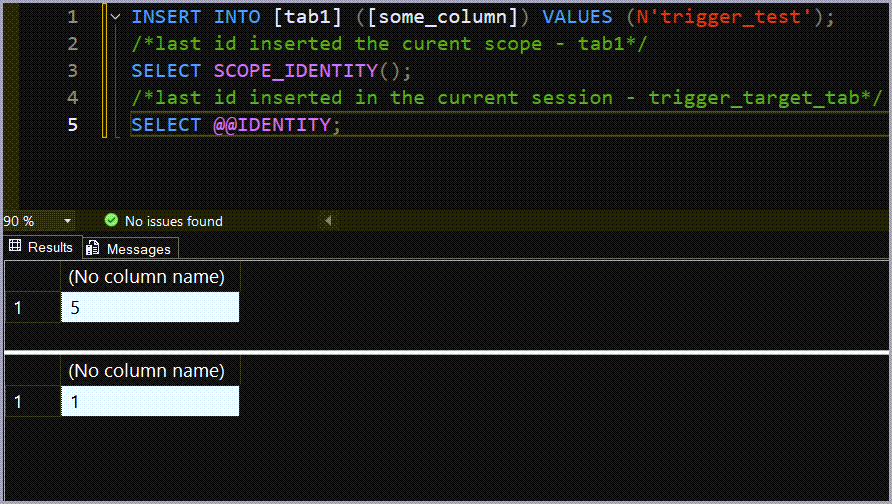
The @@IDENTITY global variable is somewhat similar to SCOPE_IDENTITY() since it’s limited to your current connection, but it differs from it by not being limited by scope.
So, it returns the last IDENTITY value generated by your actions regardless if it’s explicitly created as a result of an INSERT statement or if it was generated by a trigger that was subsequently fired.
To demo this, I create a new table and also add a trigger to an existing table.
| 1 2 3 4 5 6 7 8 9 10 11 12 13 14 15 | /*table that will be targeted by trigger*/ CREATE TABLE [trigger_target_tab] ( [id] INT NOT NULL IDENTITY(1,1), [some_column] NVARCHAR(128)); GO /*trigger on tab1 that will insert a row in trigger_target_tab*/ CREATE TRIGGER [insert_into_trigger_target] ON [tab1] FOR INSERT AS INSERT INTO [trigger_target_tab] ([some_column]) SELECT inserted.[some_column] FROM inserted; GO |
Now, an INSERT into tab1 will cause the trigger to fire and also insert a row in trigger_target_tab.
| 1 2 3 4 5 | INSERT INTO [tab1] ([some_column]) VALUES (N'trigger_test'); /*last id inserted in the current scope - tab1*/ SELECT SCOPE_IDENTITY(); /*last id inserted in the current session - trigger_target_tab*/ SELECT @@IDENTITY; |
Limitations
- Needs to be executed in the same session/connection as the statement that generated the IDENTITY value.
- If you insert data then do something to reseed/reset the IDENTITY column, it will still show the previously generated IDENTITY value.
IDENT_CURRENT()
The IDENT_CURRENT() function allows you to return the current IDENTITY value for a specific table, regardless of the session and scope in which that value was generated.
| 1 2 3 4 | SELECT IDENT_CURRENT('tab1') AS [last_tab1_id], IDENT_CURRENT('negative_increment_tab') AS [last_ni_tab_id], IDENT_CURRENT('negative_seed_tab') AS [last_ns_tab_id], IDENT_CURRENT('trigger_target_tab') AS [last_tt_tab_id]; |

This gives you a lot of flexibility since the only requirement is to provide a table name when calling it.
It also provides updated values even in reseed/reset scenarios.
But it also depends what your use case is.
If you don’t want potential interference from other sessions, then it’s not the right tool for the job.
Similarly, you can use IDENT_SEED() and IDENT_INCR() to get the seed and increment values for a given table’s IDENTITY column.
| 1 2 | SELECT IDENT_SEED('negative_increment_tab') AS [id_seed], IDENT_INCR('negative_increment_tab') AS [id_increment]; |

sys.identity_columns
The sys.identity_columns catalog view can be used to return the similar information as the IDENT_* functions
| 1 2 3 4 5 6 7 8 9 | SELECT [t].[name] AS [table], [ic].[name] AS [identity_column], TYPE_NAME([ic].[system_type_id]) AS [data_type], [ic].[seed_value], [ic].[increment_value], [ic].[last_value] FROM [sys].[identity_columns] AS [ic] INNER JOIN [sys].[tables] AS [t] ON [ic].[object_id] = [t].[object_id]; |

This has the same limitation as IDENT_CURRENT(). Meaning that you’ll see the last IDENTITY value per table regardless which session generated it and when.
DBCC CHECKIDENT (‘table_name’, NORESEED)
I left DBCC CHECKIDENT for last because the output is a message, not a result set, so it’s not really useful if you plan to do something further down the line with the current IDENTITY value.
| 1 | DBCC CHECKIDENT ('tab1', NORESEED); |
The output of this command is:
Checking identity information: current identity value ’10’, current column value ’10’.
DBCC execution completed. If DBCC printed error messages, contact your system administrator.
Word of warning: If you do opt to use DBCC CHECKIDENT, just keep in mind that you can end up resetting the current IDENTITY if you forget to specify NORESEED.
Read the remarks in the official documentation.
Inserts in IDENTITY columns
IDENTITY columns also allow you to insert records that have explicit values for said columns.
The only requirement here being that IDENTITY_INSERT needs to be set to ON for the target table before doing the insert(s).
And needs to be set to OFF right after the insert is done.
| 1 2 3 4 5 6 7 8 9 10 11 12 13 | /*enable identity insert for tab1*/ SET IDENTITY_INSERT [tab1] ON; /*do the insert*/ INSERT INTO [tab1] ([id], [some_column]) VALUES (10,N'explicit id'); /*disable identity insert for tab1*/ SET IDENTITY_INSERT [tab1] OFF; /*check the table's contents*/ SELECT * FROM [tab1]; /*check the curent identity value*/ SELECT IDENT_CURRENT('tab1'); |

Unlike sequences, SQL Server keeps the IDENTITY column in sync with the last value explicitly inserted, so you won’t run into issues when going back to auto-generated values.
The caveat is that IDENTITY_INSERT can only be set to ON for only one table at a time per session.
| 1 2 3 4 5 6 | /*enable identity insert for tab1*/ SET IDENTITY_INSERT [dbo].[tab1] ON; /*enable identity insert for negative_seed_tab*/ SET IDENTITY_INSERT [dbo].[negative_seed_tab] ON; /*disable identity insert for tab1*/ SET IDENTITY_INSERT [dbo].[tab1] OFF; |
In this scenario, the following error is thrown by SQL Server:
Msg 8107, Level 16, State 1, Line 4
IDENTITY_INSERT is already ON for table ‘AppDB.dbo.tab1’. Cannot perform SET operation for table ‘dbo.negative_seed_tab’.
Updates on IDENTITY columns
SQL Server’s IDENTITY columns do not allow updates, even if you set IDENTITY_INSERT to ON.
| 1 2 3 4 5 6 7 8 9 | /*enable identity insert for tab1*/ SET IDENTITY_INSERT [tab1] ON; /*attempt an update on the id column*/ UPDATE [tab1] SET [id] = 11 WHERE [id] = 10; GO /*disable identity insert for tab1*/ SET IDENTITY_INSERT [tab1] OFF; |
The above UPDATE statement will result in the following error message:
Msg 8102, Level 16, State 1, Line 4
Cannot update identity column ‘id’.
Reseed/reset IDENTITY columns
This all depends on how much data is removed from the table.
TRUNCATE TABLE
If you plan on deleting all the records in a table and want to reset the IDENTITY column, I recommend you use TRUNCATE.
It uses less transaction log space, it’s much faster than a DELETE, and it also resets the IDENTITY column automatically.
| 1 2 3 4 5 6 | /*check current ID before truncating table*/ SELECT IDENT_CURRENT('tab1') AS [id_before_truncate]; /*truncate the table*/ TRUNCATE TABLE [tab1]; /*check again after truncating table*/ SELECT IDENT_CURRENT('tab1') AS [id_after_truncate]; |

DBCC CHECKIDENT
If only some records have been deleted from the table, then DBCC CHECKIDENT ('table_name', RESEED, [MAX(id)]); will sync the last IDENTITY value with the MAX(id) found in the table.
| 1 2 3 4 5 6 7 8 9 10 11 12 13 | /*insert 100 rows*/ INSERT INTO [tab1] ([some_column]) VALUES (N'xyz'); GO 100 /*check IDENTITY value after insert*/ SELECT SCOPE_IDENTITY() AS [current_id_after_insert]; /*delete the last 30 records*/ DELETE FROM [tab1] WHERE [id] > 70; /*check IDENTITY value after delete*/ SELECT IDENT_CURRENT('tab1') AS [current_id_after_delete]; /*sync IDENTITY with MAX(id)*/ DBCC CHECKIDENT ('tab1', RESEED, 70); /*check IDENTITY value after DBCC*/ SELECT IDENT_CURRENT('tab1') AS [current_id_after_dbcc]; |

Why I’m not using SCOPE_IDENTITY in the last two checks in the above example
Keep in mind that tab1 still has the trigger that inserts data into trigger_target_tab.
And there are 2 records in that table from previous examples.
I’m running this T-SQL in the same Query Editor window (same session) as the above example.
| 1 2 3 4 5 6 7 8 9 10 11 | /*truncate trigger_target_tab as well*/ TRUNCATE TABLE [trigger_target_tab]; /*check ID values*/ SELECT /*last ID value generated in the current scope*/ SCOPE_IDENTITY() AS [scope_identity], /*last ID value generated in current session regardless of scope*/ @@IDENTITY AS [@@identity], /*current last ID value for tab1*/ IDENT_CURRENT('tab1') AS [ident_current_tab1], /*current last ID value for trigger_target_tab*/ IDENT_CURRENT('trigger_target_tab') AS [ident_current_trigger_target_tab]; |

At this point, both tables involved have had their IDENTITY columns reseeded to match their contents.
Notice how:
- SCOPE_IDENTITY() still shows the last IDENTITY value generated during the insert in tab1
- @@IDENTITY shows the last IDENTITY value generated by the trigger insert in trigger_target_tab
- The only updated IDENTITY values are returned by IDENT_CURRENT()
Behavior of IDENTITY columns on rollback or failure
Transaction rollback
I’m truncating the tab1 table to start with a clean slate.
| 1 | TRUNCATE TABLE [tab1]; |
And then I run the following in one go:
| 1 2 3 4 5 6 7 8 9 10 11 12 13 14 15 16 | /*check identity values before doing anything*/ SELECT SCOPE_IDENTITY() AS [scope_identity], IDENT_CURRENT('tab1') AS [ident_current]; /*insert in a transaction that is rolled back*/ BEGIN TRAN INSERT INTO [tab1] VALUES (N'abcdef'), (N'another row'), (N'one more row'), (N'fourth row'); ROLLBACK; /*check again*/ SELECT SCOPE_IDENTITY() AS [scope_identity], IDENT_CURRENT('tab1') AS [ident_current]; /*check table contents*/ SELECT * FROM [tab1]; |

Notice how, even if insert was rolled back, the identity value has been incremented and is unaffected by the rollback.
Insert failure
Truncating tab1 again.
| 1 | TRUNCATE TABLE [tab1]; |
Here it depends on where the error occurs.
If the error happens when the statement is being parsed (wrong column name, numbers of columns and values don’t match, etc) then the IDENTITY value won’t change.
This is because the statement doesn’t really get to the point where it tries to insert the data into the table.
I’ll be skipping the demo for this specific scenario.
If INSERT statement is valid, but an error occurs when actually inserting the data, then .
One easy way to test this is to cause a unique constraint/index violation.
First, I create a unique index.
| 1 | CREATE UNIQUE INDEX [uq_tab1] ON [tab1] ([some_column]); |
I then run this INSERT statement so that I have some data in tab1.
| 1 2 3 4 5 | INSERT INTO [tab1] VALUES (N'abcdef'), (N'another row'), (N'one more row'), (N'fourth row'); |
And now I run the following T-SQL all at once.
| 1 2 3 4 5 6 7 8 9 10 11 12 13 14 15 16 17 18 19 20 21 22 | /*check identity values before doing anything - result set 1*/ SELECT SCOPE_IDENTITY() AS [scope_identity], IDENT_CURRENT('tab1') AS [ident_current]; GO INSERT INTO [tab1] VALUES (N'abcdef'), (N'another row'), (N'one more row'), (N'fourth row'); GO /*check again - result set 2*/ SELECT SCOPE_IDENTITY() AS [scope_identity], IDENT_CURRENT('tab1') AS [ident_current]; /*also try with a multiple INSERT statements*/ INSERT INTO [tab1] VALUES (N'abcdef'); INSERT INTO [tab1] VALUES (N'another row'); INSERT INTO [tab1] VALUES (N'one more row'); INSERT INTO [tab1] VALUES (N'fourth row'); GO /*check again - result set 3*/ SELECT SCOPE_IDENTITY() AS [scope_identity], IDENT_CURRENT('tab1') AS [ident_current]; |

Result sets explained:
- This is a pre-check, at this point tab1 only has the 4 previously inserted rows
- Is the check done after the first failed insert attempt. Notice how, even if the INSERT contained 4 records, the IDENTITY value was only incremented once (to 5) because the statement failed at the first duplicate.
- In this case, the IDENTITY value was incremented 4 separate times (to 9), once for each INSERT statement.
Impact on large inserts
The insert operator will be single-threaded when the inserted data doesn’t come with it’s own identity values and IDENTITY_INSERT isn’t set to ON beforehand.
And this makes sense because the only way SQL Server can insure consecutive unique values are given to the records inserted via bulk insert is to have a single thread process the INSERT operator.
You can more about that in my post on testing large insert speeds in SQL Server.
But, for a quick demo, I’ll clear the table, drop the trigger and unique index.
| 1 2 3 4 5 6 | TRUNCATE TABLE [tab1]; GO DROP TRIGGER [dbo].[insert_into_trigger_target]; GO DROP INDEX [uq_tab1] ON [tab1]; GO |
I’ll be using the DisplayName column in the Users table of the StackOverflow database as my source.
So, I might as well add an index on it to give the database engine fewer 8KB pages to read.
| 1 2 3 4 5 | USE [StackOverflow] GO CREATE INDEX [ix_users_displayname] ON [dbo].[Users]([DisplayName]) WITH (ONLINE=OFF, MAXDOP=0); GO |
For reference the Users table has 8917507 rows.
Round 1 – IDENTITY_INSERT OFF
I’m cheating a bit here with the query hint, but I just want to force a parallel plan to drive the point home.
| 1 2 3 4 5 6 | SET STATISTICS TIME ON; INSERT INTO [tab1] WITH(TABLOCK) ([some_column]) SELECT [DisplayName] FROM [StackOverflow]..[Users] OPTION(USE HINT('ENABLE_PARALLEL_PLAN_PREFERENCE')); |

Notice how the Nonclustered Index Scan (read operation) is parallel, but the rest of the operators (aside from the Gather Streams one) are single-threaded.
And time statistics output for this statement:
SQL Server Execution Times:
CPU time = 6312 ms, elapsed time = 4720 ms.
Keep in mind that the elapsed time is the actual duration of the execution.
Round 2 – IDENTITY_INSERT ON
Before running the insert, I truncate the table and clear the cache.
| 1 2 3 | TRUNCATE TABLE [tab1]; DBCC DROPCLEANBUFFERS; DBCC FREEPROCCACHE; |
Then I run the following version of the insert:
| 1 2 3 4 5 6 7 8 9 10 | SET STATISTICS TIME ON; SET IDENTITY_INSERT [tab1] ON; INSERT INTO [tab1] WITH(TABLOCK) ([id], [some_column]) SELECT [id], [displayname] FROM [StackOverflow]..[Users] OPTION(USE HINT('ENABLE_PARALLEL_PLAN_PREFERENCE')); SET IDENTITY_INSERT [tab1] OFF; |

Notice that in this case the entire plan, including the Table Insert operator, went parallel.
And the execution time dropped as a result:
SQL Server Execution Times:
CPU time = 5795 ms, elapsed time = 1583 ms.
Conclusion
SQL Server’s IDENTITY columns are a flexible and robust way of ensuring an auto-incrementing integer values for each record inserted in a table.
In most cases, they’re the go-to option for surrogate keys and an easy way to guarantee uniqueness of a record.
Unlike sequences, they’re not prone to getting out of sync when an insert with explicit IDENTITY values is done.
And also less prone to causing unique constraint violation errors (again, check the DBCC CHECKIDENT documentation for details).